



We help businesses across Orlando, Tampa, and Lakeland-Winter Haven get expert managed IT services with security built in, from a team that knows you by name.




With the rising popularity of "work from home" policies, businesses have a growing need for effective collaboration tools that make it easy to coordinate work from anywhere. This has given rise to a new industry of business communication and collaboration tools with two leaders: Slack and Microsoft Teams.
These two competing products are at the pinnacle of the business communication and collaboration tool market. This naturally leads to comparisons and Google searches like, "Which is better Slack vs Microsoft Teams" or, "What is Microsoft Teams vs Slack?"
So, which of these two tools is the best business communication solution for your business? Let's take a look at some of the Microsoft Teams features vs Slack to see which one provides the performance and convenience your team needs.
One of the first things that most companies check when comparing Slack vs Microsoft Teams collaboration software is the price.
If you go to the Slack pricing page, you'll find that the platform has three pricing tiers: Free, Standard, and Plus. As of April 12, 2019, the prices for each are:
Compare this to the Microsoft Teams app, which also uses three tiers that are each billed annually: Free, Office 365 Business Premium, and Office 365 Enterprise E3. As of April 12, 2019, the costs for each tier are:
In a pure cost comparison, Slack appears to be the more attractive option for each paid tier of service. However, the Office 365 subscription tiers for Microsoft Teams collaboration software include access to the desktop versions of Microsoft Office applications such as Word, Excel, PowerPoint, and OneNote. If you're already using any of these applications, you can enjoy the convenience of having an all-in-one vendor for your business communication and collaboration software rather than having to keep track of two (or more) different vendors.
While cost is always a factor when comparing collaboration platforms, it's also important to consider what specific collaboration tools each platform offers. Here's a comparison of Slack vs Microsoft Teams collaboration tools:
So, if a company had 50 employees, Slack would provide a total of 1,000 GB of space and Microsoft Teams would provide 1,500 GB of space (1 TB shared and 10 GB additional space per employee)—at 100 employees, both solutions provide the same total storage at the top tier (2 TB). In the Microsoft Teams vs Slack comparison, Teams beats Slack for storage space at all levels for organizations with under 100 employees.
Security is an enormous issue for any organization. Data breaches and leaks of sensitive information can cost an average of 3.86 million dollars, according to the 2018 Cost of a Data Breach Study by Ponemon and IBM. So, any business communication and collaboration software you use needs to be as secure as possible.
Microsoft Teams and Slack both offer increasing levels of security with each tier of their respective platforms. Here's a list of some of the security measures used by each platform:
As noted in the PCMag.com article, "Microsoft Teams and Slack are ISO 27001-compliant, but Microsoft adds a heap of other security and compliance certifications for Microsoft Teams, including ISO 27018, SSAE16 SOC 1 and SOC 2, HIPAA, and EU Model Clauses (EUMC)." So, in the security comparison for Slack vs Microsoft Teams, Teams comes out ahead.
To sum up the comparison between Slack and Microsoft Teams, here's a table:
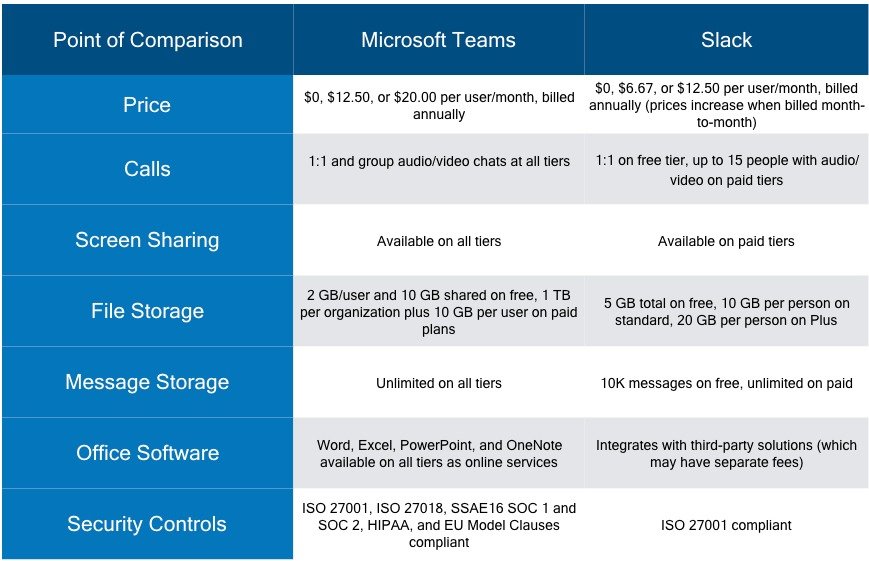
All in all, Microsoft Teams outperforms Slack as a business tool, providing more built-in collaboration tools, better security, and more storage—which may be well worth the higher price point for many organizations. In fact, simply being bundled with Word, Excel, PowerPoint, and OneNote in the free version of the tool (and adding OneDrive, SharePoint, Planner, Yammer, and other 365 services in the paid versions) may more than equalize the cost differences between the two platforms.
Want to learn more about Microsoft Teams and how you can leverage it (and other business collaboration tools) to improve your organization's efficiency? Schedule a call with the Protected Trust team.
We help businesses across Orlando, Tampa, and Lakeland-Winter Haven get expert managed IT services with security built in, from a team that knows you by name.